Web · · 6 min read
Online booking and Square Terminal for a nail salon
How a Newbury Park nail salon got bilingual online booking, a phone-first admin panel and Square Terminal payments at the front desk.
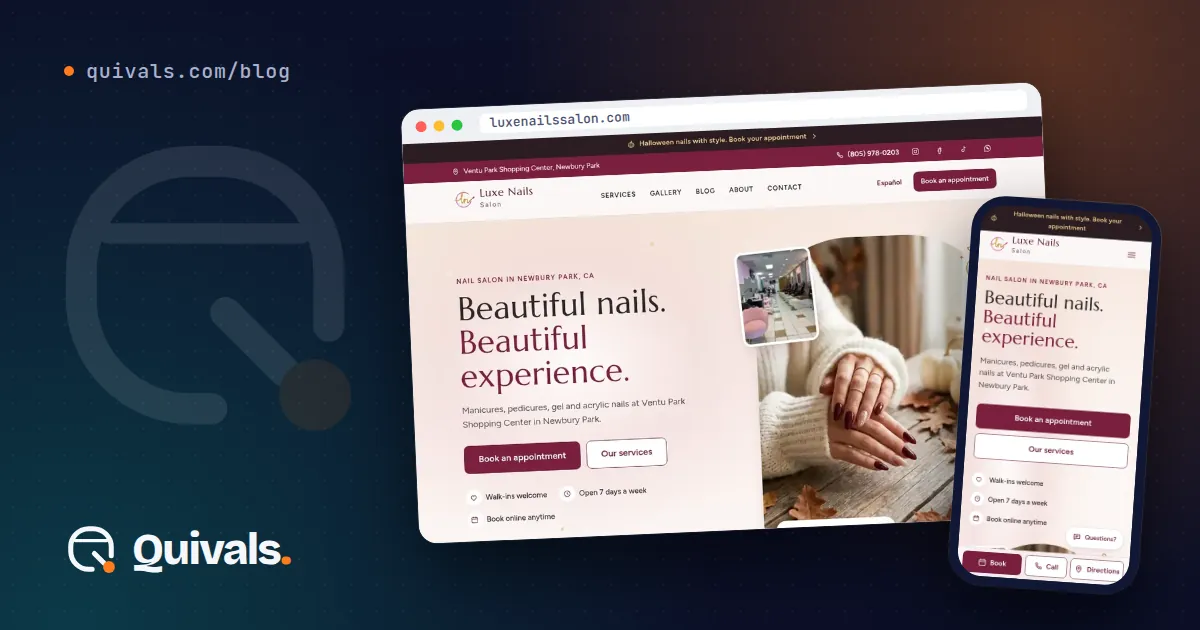
Most salons run on a mix of phone calls, text messages, a paper book and a card reader that knows nothing about the appointment. It works until it doesn’t: two clients booked for the same technician, a commission calculated from memory, a client who wanted to book in Spanish and gave up.
This is the story of how we moved Luxe Nails Salon, a nail salon in Newbury Park, California, to online booking in English and Spanish, with an admin panel that staff use from their phones and card payments on a Square Terminal at the front desk. If you own a salon, spa or any appointment-based business, the decisions we made here apply to you too.
The problem: the day lived in too many places
The salon wanted two things. Clients should be able to book on their own, in English or Spanish, at any hour. And the people running the salon should be able to manage the whole day from a phone, without sitting at a computer.
Behind those two goals sat a third one that’s easy to miss: everything had to connect. A booking should become an appointment on the right technician’s calendar. That appointment should become a payment. The payment should feed commissions, tips and reports. When those pieces live in separate apps, someone has to copy data by hand, and that’s where mistakes come from.
What we built
We built a bilingual website with its own booking flow and a mobile admin panel, all in one system.
Online booking on the salon’s own site. Clients go to /book (or /es/book in Spanish) and move through four steps: service, date, time and technician. They can pick a favorite technician or take whoever is free. The site never offers a time that’s already taken, and if two people try to grab the same slot at the same moment, only one booking goes through. The other client sees the times that are still open.
The salon confirms each request. A new booking stays pending until the salon confirms it. We chose this on purpose. A salon knows things a calendar doesn’t: a technician running late, a service that takes longer for a specific client. Automatic confirmation is faster, but a quick human check protects the day.
No card to book. The booking flow never asks for a card. We weighed a deposit against friction and went with the lowest barrier: a client should be able to book without reaching for a wallet.
A panel built for the phone. The admin panel covers appointments, a calendar for each technician, clients, commissions, tips, payroll every two weeks, reports and expenses. The panel is in Spanish, because that’s the language the team works in, while the public site defaults to English with a full Spanish version.
A check-in screen at the salon. A screen at the front (/local) lets walk-in clients sign in, so they enter the same queue as everyone else instead of a separate list on paper.
Email and text notices. Clients get a notice when their request arrives and another when it’s confirmed.
Why Square Terminal and not online payment
The salon uses Square, but not the way many people expect. There’s no online payment at all. Instead, the panel sends the charge to a Square Terminal at the front desk through Square’s Terminal API.
Here’s why. Salon prices often change at the chair: a design gets added, a discount applies, a tip comes at the end. Charging online at booking time would mean refunds and adjustments. Charging at the front desk, from the same appointment record, means the final amount is right, the payment is tied to the visit and the commission is calculated from what was actually charged.
This went live on October 13, 2026, and we confirmed it with a real $1 test charge before the salon used it with clients. That step matters. A sandbox test proves the code works; a real charge proves the account, the device and the webhook all work together.
How we checked the work
A booking system that fails quietly is worse than no system at all, so we put most of our effort into testing:
- Automated tests. The last recorded count is 191 unit tests and 143 end-to-end tests, run against booking, the panel and payments.
- Accessibility. On September 24, 2026 we ran a WCAG 2.1 AA review with axe on 11 public pages and 15 panel screens, with no failures.
- Search. The site became indexable on October 15, 2026, and on October 16 Google Search Console accepted its sitemap with 78 pages.
None of these numbers is a sales figure, and we won’t pretend they are. What they tell you is that the system was checked before real clients depended on it.
What this means for your business
You don’t need a nail salon to take something from this project. A few lessons hold for any business that runs on appointments:
- Own your booking flow when it matters. A third-party booking page is fine for many businesses. If you need rules that are specific to you, like technician rotation, Spanish-speaking staff or pending confirmation, a booking flow on your own site gives you that control.
- Prevent double booking in the system, not by habit. If two clients can book the same slot, eventually they will. The check has to happen at the moment of booking, not when someone notices.
- Decide where the human check belongs. Fully automatic sounds efficient. Often a short confirmation step, by the person who knows the schedule, saves more time than it costs.
- Charge where the price is final. If your prices change during the visit, charging at the counter from the appointment record beats charging online and fixing it later.
- Build for the device your team actually holds. If your staff live on their phones, the admin panel has to work there first.
- Speak your clients’ language, and your team’s. The public site and the panel don’t need the same default language. Choose each one for the people who use it.
Where to start
If your booking lives in phone calls and a paper book, start by writing down your real rules: who confirms, how you assign technicians, when you charge. Those rules are the design. The software comes after.
You can read the short version of this project in our work, or see how we approach projects like this on our web modernization and process automation pages.
Want to talk about your own booking setup? WhatsApp or text us at (805) 750-3255, or use the contact form.